Frequently Asked Questions
This FAQ addresses common questions and issues users may encounter with Pynenc.
Why can’t I define tasks in a module that can run as a script?
In Pynenc, tasks are not supported in modules that are intended to run as scripts. This includes any module executed directly (such as through python script.py or python -m module) where its __name__ attribute is set to "__main__".
The limitation arises because, when executed as the main program, the module name (func.__module__) is interpreted as "__main__". In a distributed environment like Pynenc, where tasks are executed in worker processes, the __main__ module refers to the worker itself, not the original script. Therefore, a task defined in such a module would be identified as __main__.task_name in the worker’s context, leading to confusion and difficulties in correctly locating and executing the task. To ensure robustness and simplicity in task management, Pynenc does not support defining tasks in modules that are executed as the main program. Tasks should be defined in regular modules for proper identification and execution in a distributed setting.
Which runner should I use?
Runner |
Best For |
|---|---|
ThreadRunner |
Development, testing, quick prototyping — runs tasks in threads within a single process |
MultiThreadRunner |
I/O-bound workloads — dynamically scales a pool of ThreadRunner processes based on load; each host runs one instance |
ProcessRunner |
CPU-bound or isolated workloads — spawns a new process per invocation for strong isolation; run one instance per host |
PersistentProcessRunner |
High-throughput production — maintains a fixed pool of long-lived worker processes for minimal spawn overhead; run one instance per host |
All four runners can be deployed across multiple hosts — each host runs its own runner instance, and they coordinate through the shared backend (broker, state backend, orchestrator). The difference is execution philosophy, not host-count:
ThreadRunner uses threads and shared memory within a single process — ideal for development.
MultiThreadRunner dynamically spawns and scales ThreadRunner sub-processes based on pending work, suiting I/O-heavy loads.
ProcessRunner spawns a fresh process per invocation, maximising isolation at the cost of spawn overhead.
PersistentProcessRunner keeps a fixed pool of worker processes alive, avoiding repeated spawn overhead and making it the recommended choice for high-throughput production.
For development and testing, ThreadRunner with memory backends is the simplest choice. For distributed production systems, use PersistentProcessRunner or ProcessRunner with a distributed backend (Redis, MongoDB, or RabbitMQ).
Runner trade-offs in practice
The Pynmon timeline makes runner behavior differences immediately visible. The screenshot below shows all four runners processing the same short-lived tasks over a ~2 second window (runners were started in order, so startup latency is visible as each begins receiving work):
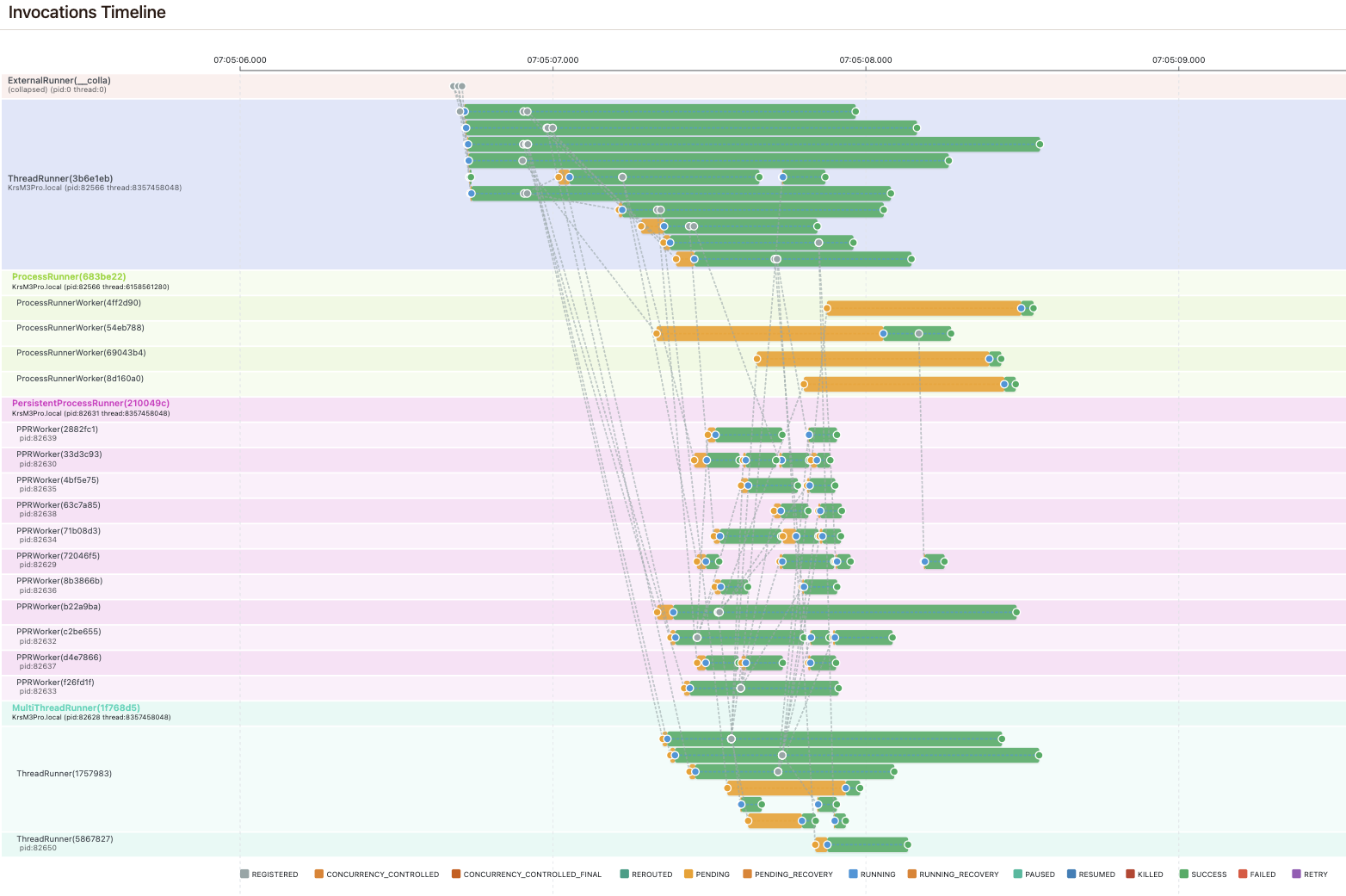
Orange bars represent PENDING time (waiting to execute), green bars represent RUNNING time (successfully completed). Key observations:
ThreadRunner — Barely any noticeable pending delay; starts running tasks fastest since it doesn’t spawn any subprocess. However, it’s limited to development — under high task counts, the GIL prevents real multi-processing and execution times will increase.
ProcessRunner — Has the largest pending time because it spawns a fresh subprocess for every task. This achieves the highest level of isolation and only makes sense for long-running tasks that require that isolation.
PersistentProcessRunner — Starts one process per CPU that dequeues and runs tasks sequentially from the broker. The main process monitors workers and recovers from failures. Has a small initial delay but then works seamlessly without peaks — the most stable choice for most production workloads.
MultiThreadRunner — Starts multiple ThreadRunner instances in independent subprocesses, each capable of running several tasks synchronously. Threads waiting on other tasks are paused, but each subprocess is still limited by the GIL. A good fit for I/O-heavy workloads. In the timeline, you can see some noticeable delays after one ThreadRunner instance already has several tasks running. The number of subprocesses and threads per subprocess are configurable.
See Runners for detailed comparisons.
What’s the difference between sync testing and memory-stack testing?
Sync testing (dev_mode_force_sync_tasks=True) bypasses the entire orchestration layer. Tasks execute inline as regular function calls — no broker, no state backend, no concurrency control. Use this for unit-testing pure task logic.
Memory-stack testing uses PynencBuilder().memory().thread_runner().build() to create a complete in-memory orchestration stack. This exercises the full lifecycle: enqueueing, priority ordering, pause/resume, concurrency control, and recovery. Use this for integration tests that validate orchestration behavior.
How do I scale from development to production?
Start with memory/SQLite backends during development — no infrastructure required.
Switch to a distributed backend (Redis, MongoDB, RabbitMQ) by installing the corresponding plugin and updating
PynencBuilder:# Development app = PynencBuilder().app_id("my_app").memory().dev_mode().build() # Production app = PynencBuilder().app_id("my_app").redis(url="redis://prod:6379").process_runner().build()
Scale runners by starting multiple runner processes on different hosts — they share the same backend and coordinate automatically.
No application code changes required — only the builder configuration changes.
Which serializer should I use?
Serializer |
Pros |
Cons |
|---|---|---|
JsonPickleSerializer (default) |
Handles most Python types, human-readable JSON |
Slightly slower than pickle |
PickleSerializer |
Fast, handles all Python types |
Not human-readable, security-sensitive |
JsonSerializer |
Fast, safe, human-readable |
Limited to JSON-compatible types |
Use JsonSerializer when your task arguments are simple types (strings, numbers, dicts, lists). Use JsonPickleSerializer for complex types like dataclasses or custom objects. Avoid PickleSerializer unless you control all inputs — pickle can execute arbitrary code during deserialization.
See Serializers.
How do I debug a task that’s stuck or failing?
Check invocation status using the Pynmon web UI or the state backend directly.
Look at the invocation’s exception — failed tasks store the full traceback.
Use the Log Explorer in Pynmon — paste or load your application logs and the Log Explorer will parse them, resolve invocation/task/runner references, and display full visual context for each log line. You can instantly see the state of every invocation mentioned in a log entry without manually querying the state backend.
Enable verbose logging:
PynencBuilder().logging_level("debug").build()or setPYNENC__LOGGING_LEVEL=debug.Use the timeline view in Pynmon to see state transitions and identify where the task stalled.
Check runner health — if a runner died, its invocations will be stuck in
RUNNINGuntil heartbeat recovery reclaims them.
Why was my task not triggered?
If a task should run from a cron schedule, event, status, result, or exception
but no invocation is created, first check trigger_task_modules.
Pynenc normally imports a task module lazily when a runner receives an invocation for a task in that module. A trigger-backed task must be registered before that first invocation can exist, because the app-level atomic service needs its conditions to decide when to create it.
Add every module that declares @app.task(triggers=...) to
trigger_task_modules using whichever configuration path you already use.
These are alternative ways to populate the same setting, not steps you need to
combine.
[tool.pynenc]
trigger_task_modules = ["myapp.scheduled_tasks", "myapp.event_handlers"]
PYNENC__TRIGGER_TASK_MODULES='["myapp.scheduled_tasks", "myapp.event_handlers"]'
from pynenc import PynencBuilder

app = (
    PynencBuilder()
    .trigger_task_modules(["myapp.scheduled_tasks", "myapp.event_handlers"])
    .build()
)
The runner imports the configured modules at startup and registers their trigger definitions. Other task modules remain lazy-loaded. Also verify that a trigger backend is configured and that a runner is active.
See Trigger System for the complete trigger setup.
What happens when a runner crashes?
Pynenc tracks runner health through heartbeats. Each runner periodically registers a heartbeat with the state backend. If a runner stops sending heartbeats (crash, network partition, OOM kill), the orchestrator detects it and:
Identifies all invocations owned by the dead runner.
Transitions them from
RUNNINGback toPENDING.Re-queues them in the broker for another runner to pick up.
The recovery interval is configurable via runner_heartbeat_interval and runner_recovery_timeout.
Can I mix plugins (e.g. Redis state + RabbitMQ broker)?
Yes. Each component (broker, state backend, orchestrator, trigger) can use a different plugin. PynencBuilder makes this explicit:
app = (
    PynencBuilder()
    .app_id("my_app")
    .redis(url="redis://localhost:6379")       # state + orchestrator
    .rabbitmq_broker(host="rabbitmq:5672")     # broker only
    .process_runner()
    .build()
)
Do I need to use workflows?
No. Workflows are entirely optional. Everything can be orchestrated using tasks alone — a task can invoke other tasks, react to their results, and chain complex logic purely through task calls and events.
Workflows add specific capabilities on top of tasks:
Shared state across sub-tasks within a workflow run.
Skip-on-retry — when a workflow is retried, sub-tasks that already succeeded are not re-executed.
Structured tracking — the workflow run groups all related invocations for monitoring and debugging.
If you don’t need these features, plain tasks with auto-orchestration are simpler and work perfectly well.
See Automatic Orchestration for task-only orchestration and Use Case 11: Workflow System for workflows.
When should I use triggers vs. workflows?
Triggers are for declarative, event-driven automation: “when X happens, run Y.” They’re stateless from the caller’s perspective — you register conditions and forget about them.
Workflows are for stateful, multi-step orchestration: “run A, then B with A’s result, then C and D in parallel.” Workflows maintain state, support deterministic replay, and can resume from failure points.
Use triggers for:
Scheduled jobs (cron)
Reacting to task completions or failures
Event-driven pipelines
Use workflows for:
Complex multi-step processes with shared state
Processes that need failure recovery and replay
Deterministic execution requirements
How do I handle tasks with large arguments?
You don’t need to do anything — Pynenc handles this automatically.
The Client Data Store monitors argument sizes during serialization. When an argument exceeds the configured size threshold, it is automatically externalized: stored separately with a content-hash key, and only the small reference key is passed through the broker. On the receiving side, the argument is transparently resolved back to the original value.
This also provides automatic deduplication — if multiple tasks receive the same large argument, it is stored once and shared via the same hash key.
You can fine-tune the behavior through configuration (e.g., size thresholds or disabling external storage for specific arguments), but the default settings work out of the box.
See Argument Caching.
What are the most common configuration mistakes?
Using memory backends in production — they don’t persist data and don’t work across processes.
Forgetting to start a runner — tasks enqueue but never execute.
Defining tasks in
__main__— workers can’t import them (see above).Not installing the plugin package — e.g., calling
.redis()withoutpip install pynenc-redis.Mismatched
app_id— if the runner and the caller use differentapp_idvalues, they won’t share the same queue.Missing
trigger_task_modules— trigger-backed tasks in lazy-loaded modules are not registered when the atomic service evaluates conditions.