Architecture
Understanding Pynenc’s design decisions and component structure.
Why Pynenc Exists
Distributed task systems often force a choice between simplicity (fire-and-forget queues) and sophistication (workflow engines with heavy infrastructure). Pynenc occupies the middle ground: it provides automatic dependency orchestration, concurrency control, and workflow support while keeping the developer experience as close to regular Python functions as possible.
Core Design Principles
Tasks Are Functions
Every Pynenc task is a regular Python function decorated with @app.task. The function’s signature defines its arguments. There is no task class to subclass, no configuration object to construct — the function is the task.
This means tasks remain importable, testable, and readable as standard Python.
Plugin Architecture
Pynenc separates what (the task logic) from where (the backend infrastructure). The core package provides:
In-memory backends for development and testing
SQLite backends for single-host scenarios
Production backends are installed as separate plugins:
Plugin |
Package |
Components Provided |
|---|---|---|
Redis |
|
Broker, Orchestrator, State Backend, Trigger |
MongoDB |
|
Broker, Orchestrator, State Backend, Trigger |
RabbitMQ |
|
Broker |
Plugins register themselves via Python entry points (pynenc.plugins). The PynencBuilder dynamically discovers plugin methods, and configuration classes support plugin-specific settings through multiple inheritance.
Invocation Lifecycle
When you call a task, Pynenc creates an invocation that progresses through a state machine:
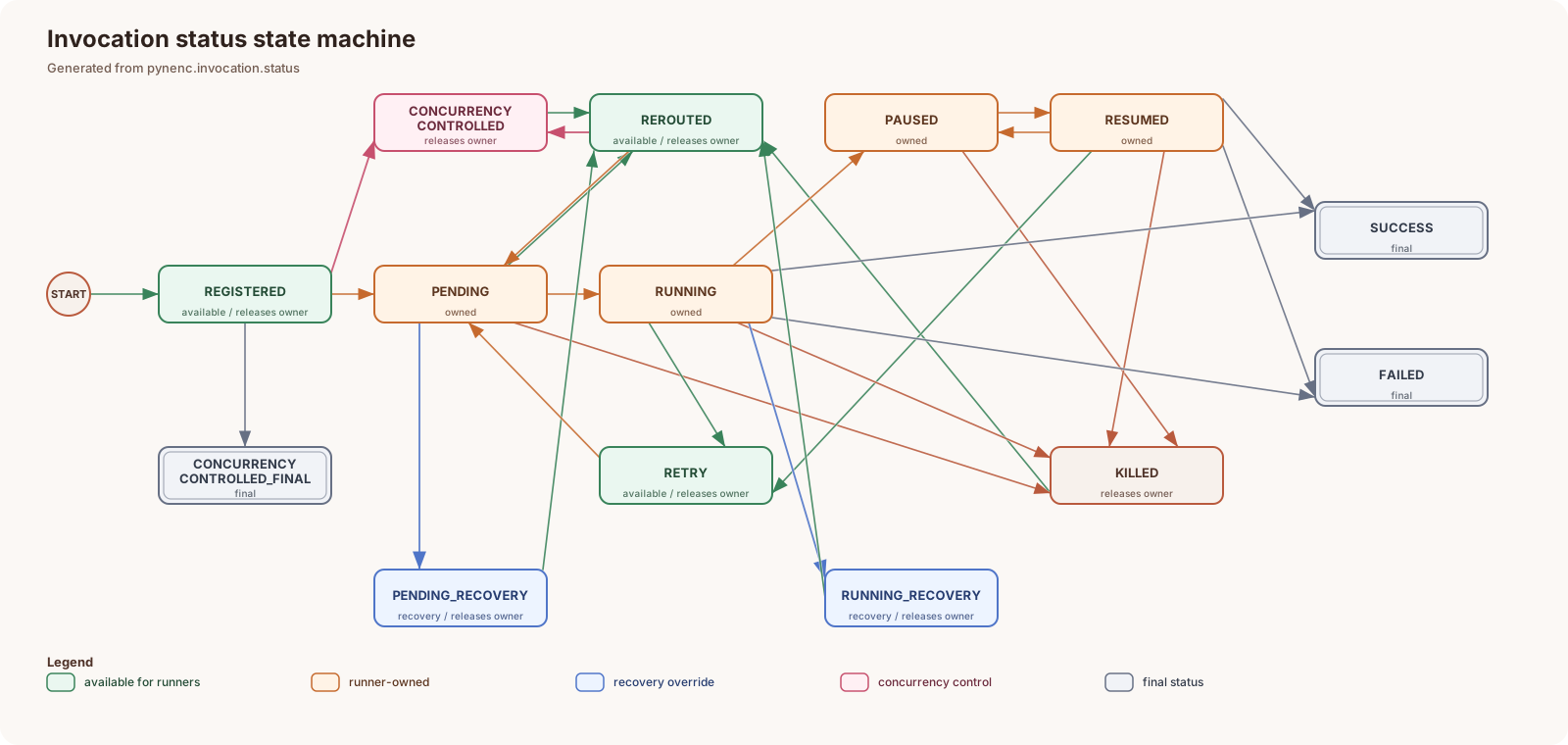
Each state transition is validated, and ownership is tracked to prevent multiple runners from processing the same invocation. Recovery mechanisms detect stuck invocations (via runner heartbeats) and re-route them.
See Invocation Status System for the complete status reference.
Automatic Orchestration
Pynenc’s orchestrator automatically manages task dependencies:
Priority by dependency count: Tasks with more dependents run first
Automatic pausing: When a task waits for results from another task, it pauses instead of blocking a runner thread
Deadlock prevention: Paused tasks free up runner slots for the tasks they depend on
This means recursive or deeply nested task graphs resolve without manual priority configuration.
Concurrency Control
Concurrency is controlled at two levels:
Registration concurrency: Prevents duplicate invocations of the same task call from being created
Running concurrency: Limits how many instances of a task (or task+arguments combination) can execute simultaneously
Four modes are available: DISABLED, TASK (one instance per task), ARGUMENTS (one per argument set), and KEYS (one per key-argument subset).
Component Architecture
┌─────────────────────────────────────┐
│              Pynenc App             │
│  ┌───────┐  ┌──────┐  ┌─────────┐   │
│  │ Tasks │  │ Conf │  │ Builder │   │
│  └───┬───┘  └──────┘  └─────────┘   │
│      │                              │
│  ┌───▼─────────────────────────┐    │
│  │        Orchestrator         │    │
│  │  (status, concurrency,      │    │
│  │   blocking, recovery)       │    │
│  └──┬───────────┬──────────┬───┘    │
│     │           │          │        │
│  ┌──▼───┐  ┌────▼────┐  ┌──▼──────┐ │
│  │Broker│  │State    │  │Trigger  │ │
│  │(queue│  │Backend  │  │(cron,   │ │
│  │ mgmt)│  │(persist)│  │ events) │ │
│  └──────┘  └─────────┘  └─────────┘ │
│                                     │
│  ┌──────────┐  ┌──────────────────┐ │
│  │ Runner   │  │ Client Data Store│ │
│  │(execute) │  │ (large arg cache)│ │
│  └──────────┘  └──────────────────┘ │
└─────────────────────────────────────┘
Components
Component |
Responsibility |
Implementations |
|---|---|---|
Broker |
Routes invocation IDs through queues; prioritizes by dependency count |
MemBroker, SQLiteBroker, + plugins |
Orchestrator |
Manages invocation lifecycle, concurrency control, blocking/waiting, runner heartbeats |
MemOrchestrator, SQLiteOrchestrator, + plugins |
State Backend |
Persists invocation data, results, exceptions, history, workflow state |
MemStateBackend, SQLiteStateBackend, + plugins |
Runner |
Retrieves invocations from broker and executes them |
ThreadRunner, MultiThreadRunner, ProcessRunner, PersistentProcessRunner, DummyRunner |
Trigger |
Manages cron schedules, event-driven conditions, and task-status-based triggers |
MemTrigger, SQLiteTrigger, + plugins |
Serializer |
Converts task arguments and results to/from string form |
JsonSerializer, JsonPickleSerializer, PickleSerializer |
Client Data Store |
Stores large serialized arguments outside the broker/state backend |
MemClientDataStore, SQLiteClientDataStore, + plugins |
Configuration Hierarchy
Configuration resolves in priority order (highest first):
Direct assignment
Environment variables (
PYNENC__FIELD_NAME)Configuration file path from environment
Configuration file (YAML, TOML, JSON)
pyproject.tomlDefault values
Task-specific configuration uses the pattern PYNENC__CONFIGTASK__MODULE#TASK__FIELD.
See Configuration System for the complete configuration reference.
Workflow System
The workflow system adds explicit, deterministic orchestration on top of the
task system. Workflow roots are declared with @app.workflow; ordinary
@app.task functions remain standalone tasks unless a workflow calls them.
Root-only random numbers, timestamps, and UUIDs are stored by workflow id, so retrying the workflow invocation replays identical values
Child task executions are recorded at the workflow level so retries can reuse existing child invocations
Workflow data persists across retries, preserving business milestones and decisions
Ordinary child tasks can share workflow data but cannot call root-only orchestration APIs
This enables complex multi-step business processes to retry without duplicating child work that already completed.
See Workflows for the workflow model and Use Case 11: Workflow System for usage examples.
Monitoring (Pynmon)
Pynmon is a built-in web interface (FastAPI + Jinja2 + HTMX) that provides:
Dashboard overview with system health
SVG-based timeline visualization of invocations across runners
Task browser with execution statistics
Invocation drill-down with status history
Workflow hierarchy visualization
Runner monitoring with heartbeat tracking
Log explorer for contextual log analysis
See Monitoring with Pynmon for the complete monitoring reference.