
Pynenc
Distributed task orchestration for Python.
Pynenc manages task execution across distributed Python processes. Tasks are regular Python functions — decorated, called like normal code, and backed by pluggable infrastructure. The orchestrator handles dependency ordering, concurrency, lifecycle tracking, and recovery automatically.
pip install pynenc
A Taste of the API
Write tasks the way you write Python. Pynenc handles the rest:
from pynenc import Pynenc

app = Pynenc()

@app.task
def add(x: int, y: int) -> int:
    return x + y

# Call it — get an invocation back, block for the result
result = add(1, 2).result   # 3
Tasks can call other tasks. Dependencies are resolved automatically — no manual wiring, no DAG configuration:
@app.task
def fibonacci(n: int) -> int:
    if n <= 1:
        return n
    return fibonacci(n - 1).result + fibonacci(n - 2).result
When fibonacci(10) runs, the orchestrator fans out sub-tasks, pauses them while
they wait for each other, and resumes them without blocking any runner thread.
See Automatic Orchestration.
Key Capabilities
Every task call becomes a tracked invocation through a validated state
machine: REGISTERED → PENDING → RUNNING → SUCCESS / FAILED. Tasks that
block on a dependency transition through PAUSED → RUNNING without holding
a runner thread. Status, ownership, results, and exceptions are all
persisted — no silent drops, no double execution.
Prevent duplicate work at two independent points: registration (should
this call even be enqueued?) and execution (should two instances run
concurrently?). Four modes — DISABLED, TASK, ARGUMENTS, KEYS —
match the argument granularity you need. Each decorator configures them
independently.
Schedule tasks declaratively: cron expressions, task status transitions,
result conditions, exceptions, or custom events registered via decorator.
Trigger state is distributed — backends include MemTrigger for tests,
SQLiteTrigger for single-host, and RedisTrigger / MongoTrigger /
RabbitMQTrigger for production. The trigger_demo sample shows cron, events, pipelines,
compensation, and composite status/result conditions in one local SQLite app.
Pynenc normally imports a task module only when a runner receives an invocation
for a task in that module. Trigger-backed tasks cannot wait for that first
invocation: the atomic service needs their conditions before it can create one.
List every module that declares @app.task(triggers=...) in
trigger_task_modules so runners import and register those definitions at
startup.
[tool.pynenc]
trigger_task_modules = ["myapp.scheduled_tasks", "myapp.event_handlers"]
Workers register a heartbeat on a configurable interval. If a runner
process dies, the orchestrator detects the missing heartbeat and
automatically re-queues its invocations — tasks stuck in RUNNING become
recoverable without operator intervention. An atomic service framework
ensures only one runner executes recovery and trigger evaluation at a time.
Decorate any function with @app.direct_task — the caller keeps the same
call syntax and gets the return value directly, no Invocation, no
.result. Toggle sync execution with a single environment variable for
local development. Distribute to workers in production without changing a
line of call-site code.
Invocation State Machine
Every invocation moves through the same validated status graph. The diagram is
generated from pynenc.invocation.status, so the documentation follows the
implementation when states or transitions change.
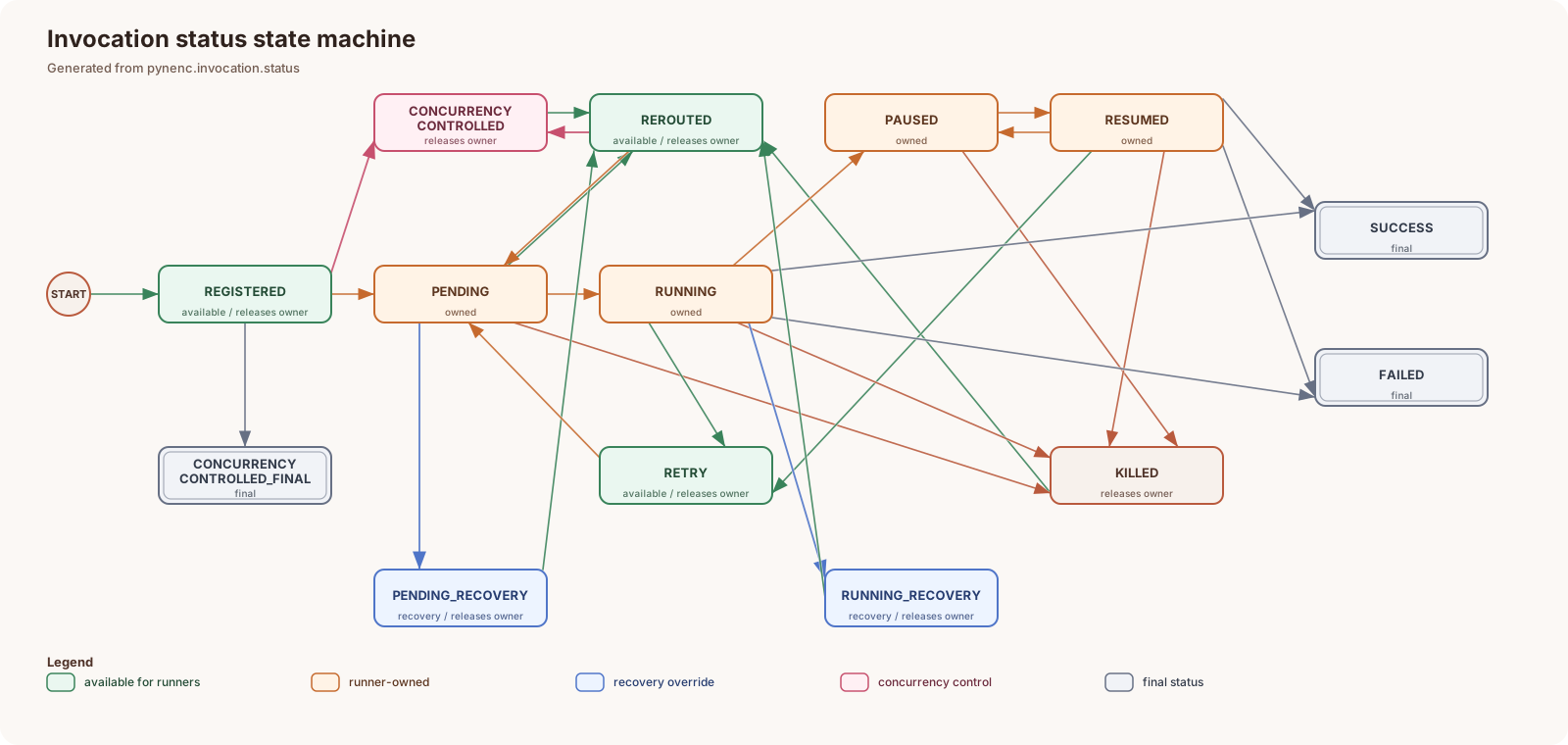
See Invocation Status System for the state definitions, ownership rules, and recovery transitions.
Pluggable Backends
The core ships with in-memory and SQLite backends. Production backends are separate installable packages — swap them without touching application code:
Plugin |
Install |
Provides |
|---|---|---|
Redis |
|
All components on Redis |
MongoDB |
|
All components on MongoDB |
RabbitMQ |
|
Broker on RabbitMQ |
PynencBuilder makes mixing plugins explicit and readable:
from pynenc import PynencBuilder

app = (
    PynencBuilder()
    .app_id("my_app")
    .redis(url="redis://localhost:6379")   # orchestrator + state + trigger
    .rabbitmq_broker(host="rabbitmq")      # swap broker to RabbitMQ
    .process_runner()
    .build()
)
Testing Without Infrastructure
Pynenc has two testing modes — pick the one that fits the test:
Sync shortcut — set PYNENC__DEV_MODE_FORCE_SYNC_TASKS=True (or
app.conf.dev_mode_force_sync_tasks = True in setUp). The task
decorator becomes transparent: calling a task runs its function directly
and returns the result inline. Zero infrastructure, zero threads — but
also no concurrency control, no pause/resume, and no deadlock detection.
Good for unit-testing pure task logic.
def setUp(self):
    tasks.app.conf.dev_mode_force_sync_tasks = True
Full in-memory stack — replace the app with a freshly built instance
backed by all Mem* components and a ThreadRunner. The full orchestration
loop runs in-process: auto-pause/resume, concurrency control, trigger
evaluation, and recovery all behave exactly as in production, with no
external services. Using PynencBuilder avoids stale cached components that
would remain if you patched conf attributes on an already-instantiated app.
def setUp(self):
    tasks.app = PynencBuilder().memory().thread_runner().build()
    self.thread = threading.Thread(target=tasks.app.runner.run, daemon=True)
    self.thread.start()

def tearDown(self):
    tasks.app.runner.stop_runner_loop()
    self.thread.join()
Built-in Monitoring
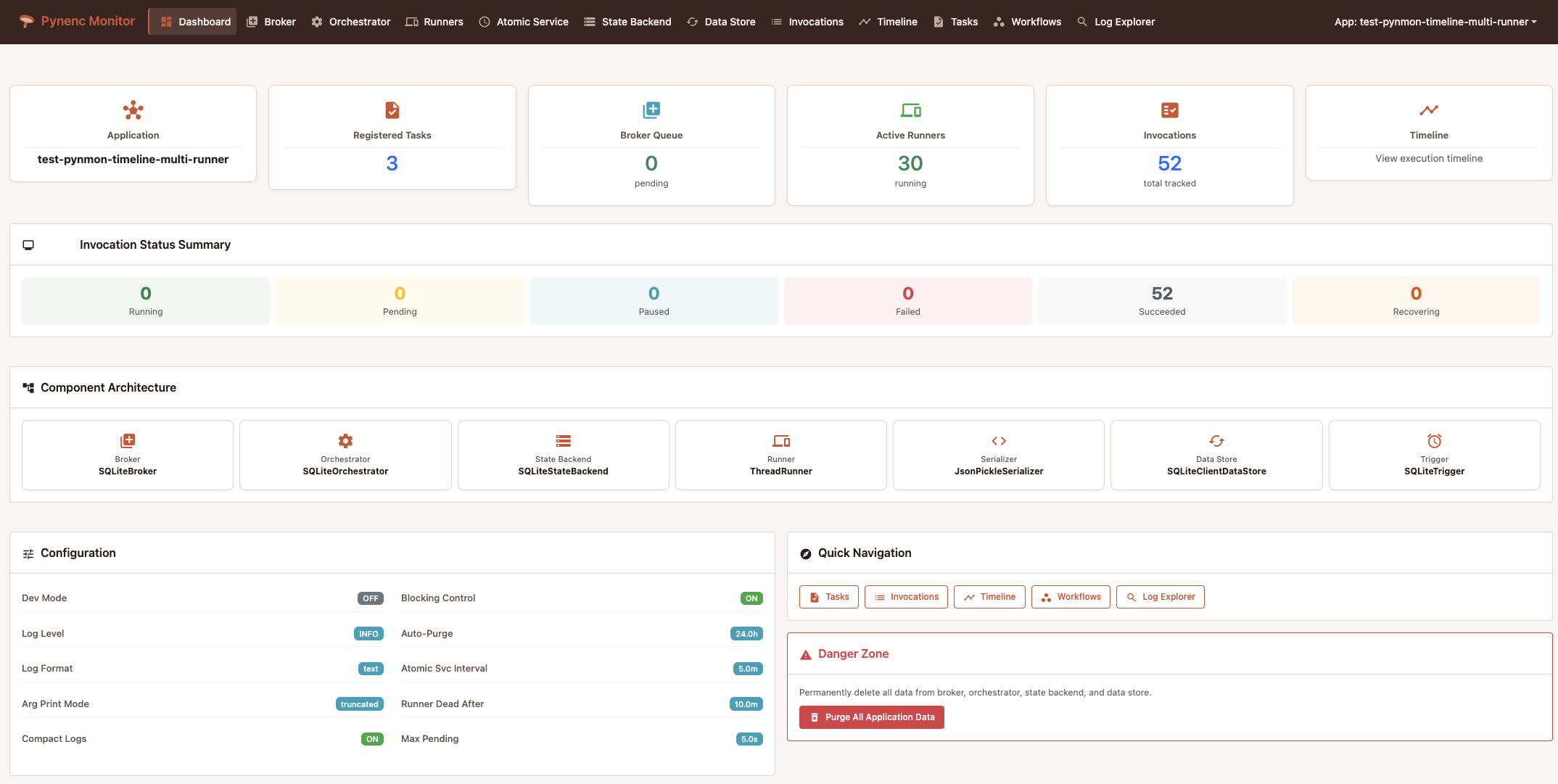
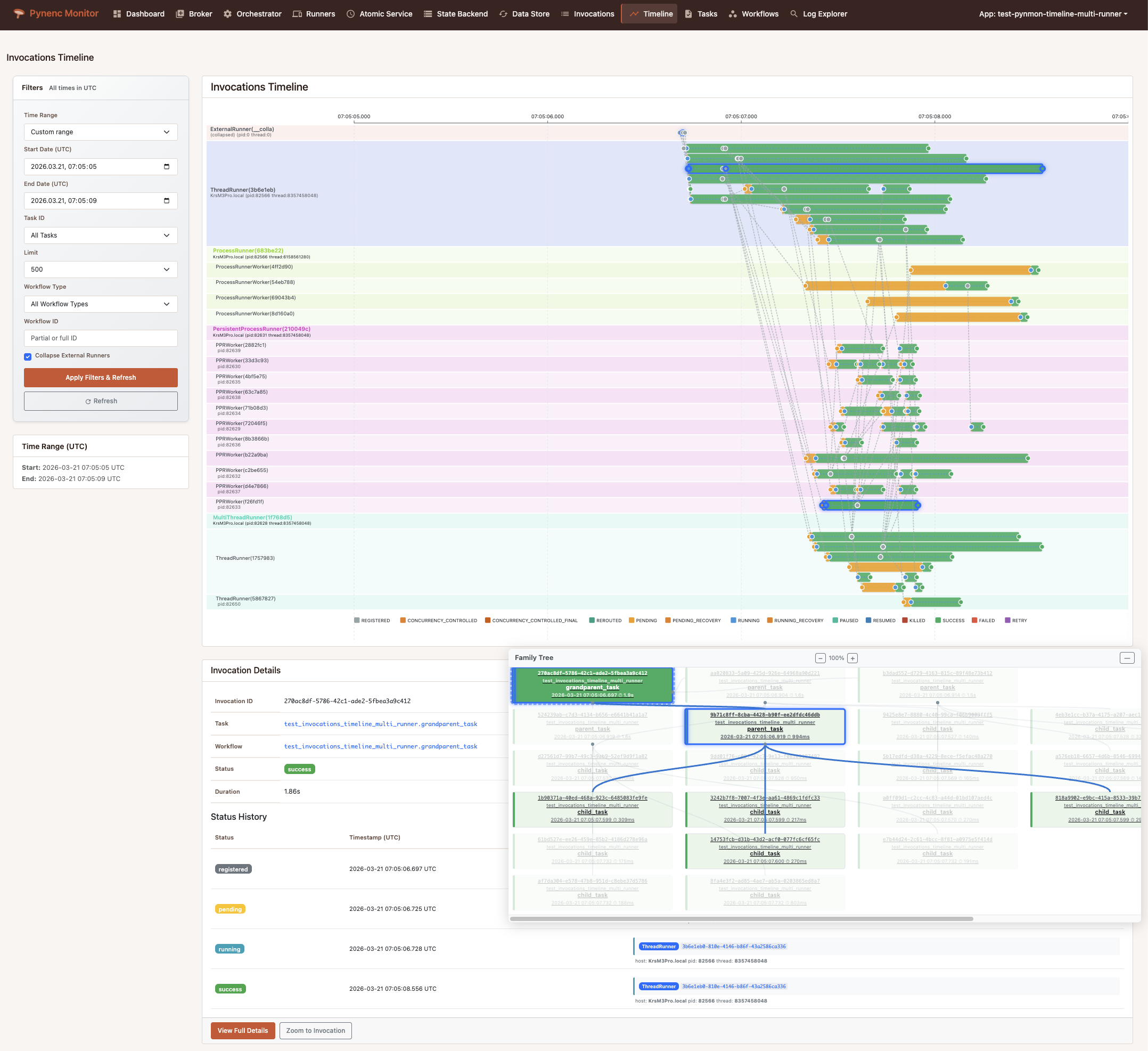
Pynmon ships with Pynenc and gives you deep, real-time visibility into your distributed execution — no external tooling required.
Where to Go Next
From zero to a working distributed task — step by step.
Concurrency, orchestration, workflows, triggers, serializers, testing.
Workflow identity, durable data, deterministic replay, and sub-workflows.
Runtime context, current invocation, runner context, and invocation attempts.
Every setting for every component, with defaults and env-var names.
Pynmon web UI — timeline, invocation explorer, runner health.
How to build your own backend plugin.
Auto-generated docs for all public classes and functions.